Percentage Difference Calculator
Compare two values fairly with the symmetric percentage difference formula. Free, no sign-up, and everything runs in your browser.

Formulas verified against standard references. Calculator logic tested with verified worked examples. Published: November 4, 2026 | Last updated: November 4, 2026. Our methodology
What the Percentage Difference Calculator Does
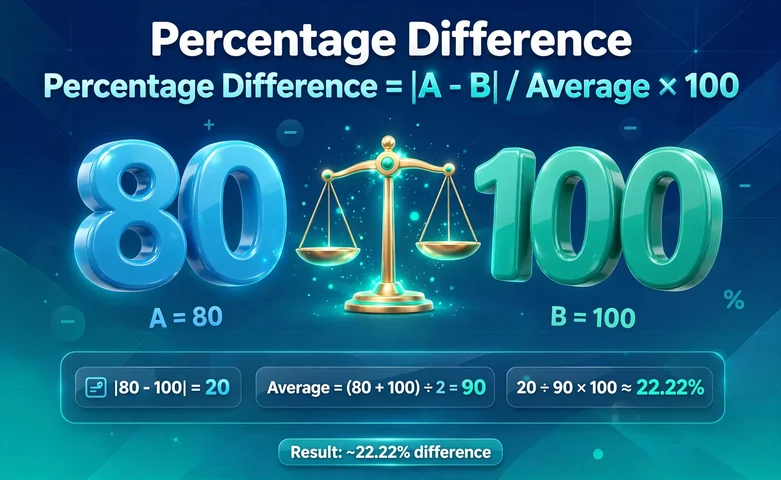
A percentage difference calculator answers one question. How far apart are two numbers? It treats both values equally, using their average as the base, so swapping the inputs always gives the same answer.
Use it for two numbers with no natural order, such as two store prices. It is free and instant.
How to Use the Percentage Difference Calculator
- Type your first value into the Value A field.
- Type your second value into the Value B field. Order does not matter.
- Press Calculate, or press Enter. The result appears with the steps.
- Press Reset to clear the form.
Two zeros give an undefined answer. One zero always gives 200%.
Percentage Difference vs Percentage Change: Which One Do You Need?
Did one value come before the other? If yes, you want change. Use our Percentage Change Calculator for a before and after.
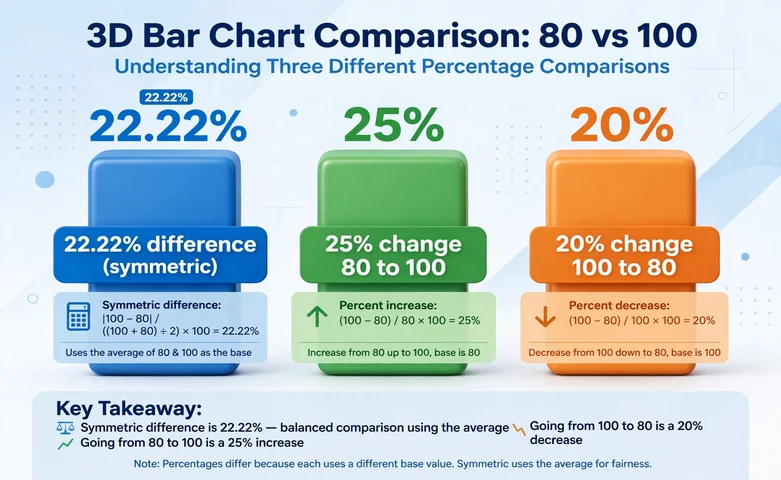
Take 80 and 100. The difference is 22.22%, the change is 25% from 80 to 100 and 20% from 100 to 80. Note that 22.22% falls between the two.
A 25% increase followed by a 25% decrease does not return you to the start. $100 becomes $125, then $93.75. Directional percentages do not cancel out.
The Percentage Difference Formula
Percentage Difference = |A − B| / ((A + B) / 2) × 100.
The 4-Step Method
- Find |A − B|, the absolute difference.
- Find (A + B) / 2, the average.
- Divide the first by the second.
- Multiply by 100.
With 10 and 15: difference 5, average 12.5, 5 / 12.5 × 100 = 40%.
Why the Formula Uses the Average
Dividing by one value picks a favorite. For 10 and 15, a base of 10 gives 50% but a base of 15 gives 33.33%. Only the average treats both values the same.
When to Use Percentage Difference
Use it when two numbers have equal standing and neither is the baseline.
- Same product at two stores.
- Two lab instruments measuring one sample.
- An experimental result versus a theoretical value.
- Peer metrics of equal rank.
When NOT to Use It
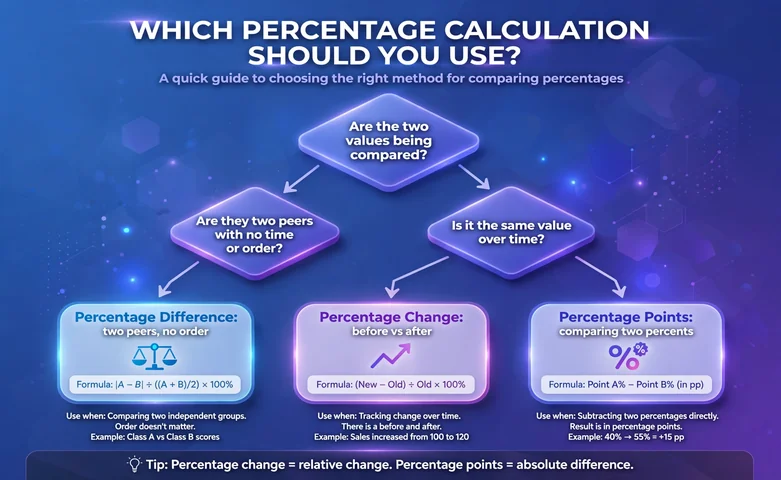
Do not use it to track change over time. That is a before-and-after job for percentage change. The gap between 40% and 55% is 15 percentage points. For part-to-whole questions, our percentage calculator does the standard job.
| When | Use | Formula |
|---|---|---|
| Two values, no natural order | Percentage difference | |A − B| / average × 100 |
| A before and an after value | Percentage change | (new − old) / old × 100 |
| Two percentages | Percentage points | new percent − old percent |
Properties Worth Knowing
Why the Answer Is Never More Than 200%
The average is always at least half the absolute difference, so the result tops out at 200%. One zero value gives 200%. Identical values give 0%.
Negative Numbers and Zero
The standard formula works best with two positives. With negatives, use |A − B| / ((|A| + |B|) / 2) × 100. For −40 and −60 that gives 40%.
Percentage Difference in Excel
In Excel or Google Sheets, use =ABS(A2-B2)/AVERAGE(A2,B2). ABS gives the absolute difference and AVERAGE gives the midpoint.
- Type your first value in cell A2 and your second in cell B2.
- In cell C2, type =ABS(A2-B2)/AVERAGE(A2,B2).
- Format C2 as a percentage.
Worked Examples
10 and 15
Difference 5, average 12.5: 5 / 12.5 × 100 = 40%.
80 and 100
Difference 20, average 90: 20 / 90 × 100 = 22.22%.
Readings 48.2 and 50.5
Difference 2.3, average 49.35: 2.3 / 49.35 × 100 = 4.66%.
Prices $899 and $949
Difference 50, average 924: 50 / 924 × 100 = 5.41%.
Common Mistakes to Avoid
- Using percentage change for values with no natural order.
- Dividing by one value instead of the average.
- Mixing up percentage points and percentage difference.
- Expecting a direction. The answer is always positive.
- Forgetting the both-zero case.
Frequently asked questions
It equals the absolute difference of the two values divided by their average, times 100. In symbols, |A − B| / ((A + B) / 2) × 100. The numerator removes any sign so order never matters, and the denominator is the midpoint between the values.
What is the difference between percentage difference and percentage change?
Percentage difference is symmetric. It divides by the average, so swapping the values gives the same answer. Percentage change is directional. It divides by the starting value, so 80 to 100 is a 25% increase while 100 to 80 is a 20% decrease.
When should I use percentage difference instead of percentage change?
Use it when two numbers have no natural order, such as two store prices, two lab readings of the same sample, or two athletes compared side by side. When one value clearly came before the other, percentage change is right because it tracks growth or decline from a starting point.
Can percentage difference be more than 100%?
Yes, but never more than 200%. The base is the average, which is at least half of the difference, so the math caps the result at 200%. That happens when one value is zero or the values have opposite signs. Identical values give 0%.
How do I calculate percentage difference in Excel?
Put the values in cells A2 and B2, then type =ABS(A2-B2)/AVERAGE(A2,B2) in a third cell and format it as a percentage. ABS gives the absolute difference and AVERAGE gives the midpoint. Multiply by 100 yourself if the cell is not formatted as a percent.
Why does the formula use the average of the two numbers?
Using the average keeps the comparison fair. Dividing by one value instead would change the answer depending on which value you picked, and it would favor one side. The average sits exactly between the two numbers, so neither value gets priority.
Can I use percentage difference with negative numbers?
You can, but the standard formula can misbehave when the average is zero or negative. The safe approach is the absolute-value variant, |A − B| / ((|A| + |B|) / 2) × 100, which keeps the base positive. For example, −40 and −60 give 40%.
What does it mean if the percentage difference is 0%?
It means the two values are identical. The absolute difference in the numerator is zero, so the whole fraction is zero regardless of the average. This is rare with real measurements, so a 0% result is worth a quick check of the inputs.
Related calculators

Percent Change Calculator
Measure percent increase or decrease between two values.
Use calculatorPercentage Calculator
Find P percent of any number, with steps.
Use calculatorAverage Calculator
Mean, median, mode, range, and more from a number list.
Use calculatorRatio Calculator
Simplify, scale, or divide an amount by a ratio.
Use calculatorFraction Calculator
Add, subtract, multiply, and divide fractions.
Use calculatorRounding Calculator
Round to tens, ones, tenths, or significant figures.
Use calculatorMean Median Mode Calculator
Find the averages of any number list.
Use calculatorStandard Deviation Calculator
Sample or population standard deviation, with steps.
Use calculatorAbsolute Value Calculator
Find |x| and the distance from zero.
Use calculatorDecimal to Fraction Converter
Turn decimals into simplified fractions.
Use calculator