Color Converter
Paste any color code, or pick a color, and see it in HEX, RGB, HSL, HSV, and CMYK instantly. Copy any row with one click. Free, no sign-up, and everything runs in your browser.
How the math works. HEX pairs are base 16, so FF means 255. RGB to HSL divides each channel by 255, then uses the largest and smallest channels to find lightness, saturation, and hue. RGB to CMYK takes K as 1 minus the largest channel, then divides the rest by what is left. The CMYK numbers are the plain math conversion, so treat them as an approximation for print work rather than a finished print file.

Formulas verified against standard references. Calculator logic tested with verified worked examples. Published: November 4, 2026 | Last updated: November 4, 2026. Our methodology
Color Formats at a Glance
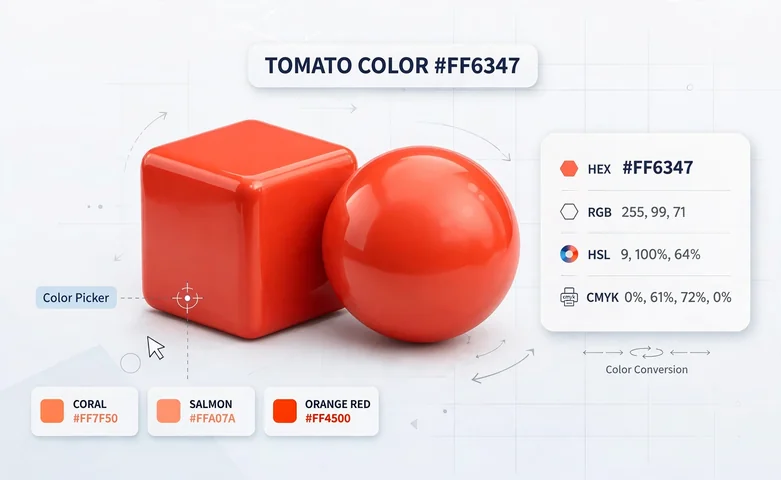
Every color on a screen or a printed page can be written in several formats, and each format suits a different job. The table below shows the five formats this color converter handles, with the same worked color in each row. That color is tomato, and you will see it carried through every section of this page.
| Format | Value ranges | Used for | Tomato example |
|---|---|---|---|
| HEX | #RRGGBB, each pair 00 to FF | Web and CSS, design handoff | #FF6347 |
| RGB | Three channels, 0 to 255 each | Screens, CSS, JavaScript | rgb(255, 99, 71) |
| HSL | Hue 0 to 360, saturation 0 to 100%, lightness 0 to 100% | CSS, design tokens | hsl(9, 100%, 64%) |
| HSV | Hue 0 to 360, saturation 0 to 100%, value 0 to 100% | Photoshop, Figma, and Illustrator pickers | hsv(9, 72%, 100%) |
| CMYK | Four inks, 0 to 100% each | cmyk(0%, 61%, 72%, 0%) | |
| CSS name | 148 keywords | Quick prototyping | tomato |
HEX is the compact way to write RGB for the web, HSL describes the same color by hue and lightness for easier tweaking, HSV is what most design pickers show, and CMYK describes ink on paper for print. The converter above turns any one of these into all the others in one step.
How to Convert Between Color Formats
Every conversion below runs on the same worked color, tomato, so you can follow one color end to end. Each conversion is computed, not estimated, and the formulas are the standard ones used across the web and print industries.
HEX to RGB
Split the HEX code into three pairs and read each pair as a base 16 number, where each digit is worth its face value times 16 plus the second digit. For #FF6347, FF is 15 x 16 + 15 = 255, 63 is 6 x 16 + 3 = 99, and 47 is 4 x 16 + 7 = 71. That gives rgb(255, 99, 71). Readers who work with raw hex digits can also use our hex converter for general base-16 conversion.
RGB to HEX
RGB to HEX is the same arithmetic in reverse. Divide each 0 to 255 channel into two hex digits. For tomato, 255 becomes FF, 99 becomes 63, and 71 becomes 47, which reassembles as #FF6347.
RGB to HSL
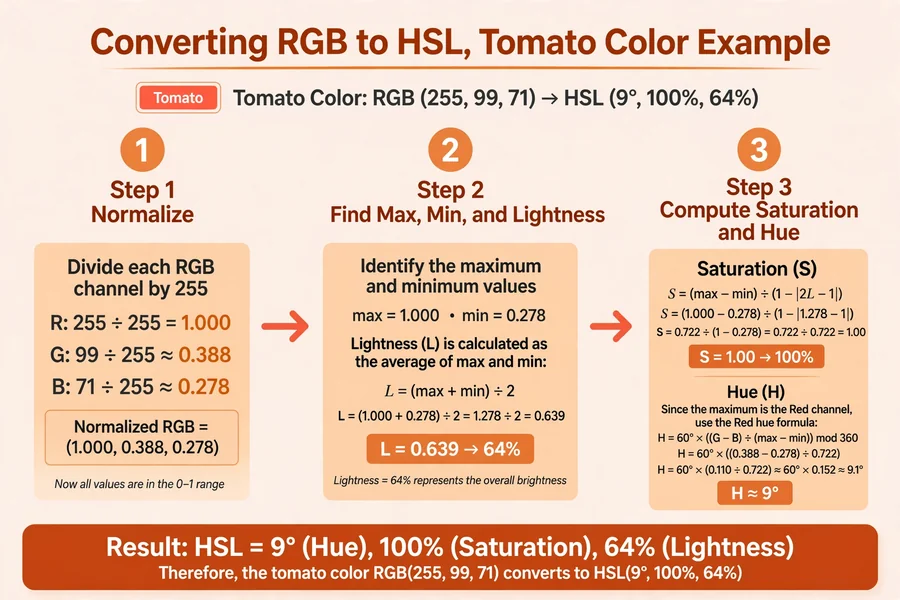
First normalize each channel by 255. For tomato that is r = 1.000, g = 0.388, b = 0.278. Take the largest value, 1.000, and the smallest, 0.278. Lightness is their average, L = (1.000 + 0.278) / 2 = 0.639, which is 64%. Saturation is the spread divided by (2 - max - min) when lightness is above 50%, so S = 0.722 / 0.722 = 1.000, which is 100%. Because the largest channel is red, hue is H = 60 x ((0.388 - 0.278) / 0.722) = 60 x 0.152 = 9.1 degrees, rounded to 9. The result is hsl(9, 100%, 64%).
HSL to RGB
The chroma method walks the math back. With H = 9, S = 1.00, L = 0.64, chroma C = (1 - |2 x 0.64 - 1|) x 1.00 = 0.72. Then X = 0.72 x (1 - |(9 / 60) mod 2 - 1|) = 0.108, and m = 0.64 - 0.36 = 0.28. A hue of 9 degrees falls in the 0 to 60 sector, so the channels are (C, X, 0). Adding m and multiplying by 255 gives R = 255, G = 99, and B = 71. The round trip lands exactly back on rgb(255, 99, 71).
RGB to CMYK
Find the black channel first. K = 1 - the largest normalized channel = 1 - 1.000 = 0. Then each ink is (1 - channel - K) / (1 - K). For tomato, C = 0%, M = (1 - 0.388) = 0.612, which is 61%, and Y = (1 - 0.278) = 0.722, which is 72%. The result is cmyk(0%, 61%, 72%, 0%).
CMYK to RGB
Each channel is 255 x (1 - ink) x (1 - K), with the inks as fractions. For tomato, R = 255 x 1 x 1 = 255, G = 255 x (1 - 0.61) = 99.45, which rounds to 99, and B = 255 x (1 - 0.72) = 71.4, which rounds to 71.
RGB to HSV
HSV shares the hue with HSL but replaces lightness with value, which is simply the largest channel. The spread is 1.000 - 0.278 = 0.722, so saturation is 0.722 / 1.000 = 72% and value is 100%. Hue uses the same 9.1 degrees as the HSL math, giving hsv(9, 72%, 100%).
Which Color Format Should You Use?
Pick the format that matches the tool in front of you, not the one that looks shortest. The right choice saves you a conversion every time you edit the color.
| What you are doing | Best format | Why |
|---|---|---|
| Writing web CSS | HEX or HSL | HEX is compact, and HSL makes lightness tweaks readable |
| Changing colors in JavaScript | RGB or HSL | Both map directly to CSS color functions |
| Sharing design tokens with a team | HSL | Hue stays fixed while shades are made by changing lightness |
| Matching a Photoshop or Figma picker | HSV | That is the color model those pickers display |
| Sending artwork to a print shop | CMYK | Printers mix ink, not light, but confirm with their ICC profile |
Transparency: Alpha in Every Format
Every format above can carry transparency, but each one writes it differently. In HEX, transparency is two extra digits at the end, from 00 for fully transparent to FF for fully opaque. Tomato at half opacity is #FF634780, because 80 in hex is 128 out of 255, which is 50%. In CSS, the rgb() and hsl() functions take a fourth value from 0 to 1 instead, so half-transparent tomato is rgba(255, 99, 71, 0.5).
Shorthand HEX follows one simple rule. Three digits double into six, so #F57 becomes #FF5577, and four digits double into eight, so #F57A becomes #FF5577AA. The shorthand is only valid when both digits of each pair match, which is why #FF6347 has no shorthand form. This color converter accepts 3, 4, 6, and 8 digit HEX and reports the alpha separately.
A Note on CMYK and Printing
The CMYK numbers on this page come from the plain mathematical conversion, and that is an approximation, not a print-ready result. Real print conversion depends on the paper, the press, and an ICC color profile that describes how that specific combination behaves. The same CMYK values can look noticeably different on coated and uncoated paper.
Screens and printers also cover different ranges of color. Screens mix red, green, and blue light and can show vivid oranges and greens that CMYK inks cannot reproduce exactly, so some colors shift when they move from screen to print. If color accuracy matters for your job, do the final conversion in Illustrator or InDesign with the print shop's profile. UXPICKLE's color converter guide gives the same advice and explains how design tokens fit into the workflow.
Common Colors in Every Format
Sixteen everyday colors with every format verified by the conversion formulas. Use this table as a quick reference when you need a known color in the format your tool expects.
| Color | HEX | RGB | HSL | CMYK |
|---|---|---|---|---|
| White | #FFFFFF | 255, 255, 255 | 0, 0%, 100% | 0%, 0%, 0%, 0% |
| Black | #000000 | 0, 0, 0 | 0, 0%, 0% | 0%, 0%, 0%, 100% |
| Red | #FF0000 | 255, 0, 0 | 0, 100%, 50% | 0%, 100%, 100%, 0% |
| Lime | #00FF00 | 0, 255, 0 | 120, 100%, 50% | 100%, 0%, 100%, 0% |
| Blue | #0000FF | 0, 0, 255 | 240, 100%, 50% | 100%, 100%, 0%, 0% |
| Yellow | #FFFF00 | 255, 255, 0 | 60, 100%, 50% | 0%, 0%, 100%, 0% |
| Cyan | #00FFFF | 0, 255, 255 | 180, 100%, 50% | 100%, 0%, 0%, 0% |
| Magenta | #FF00FF | 255, 0, 255 | 300, 100%, 50% | 0%, 100%, 0%, 0% |
| Silver | #C0C0C0 | 192, 192, 192 | 0, 0%, 75% | 0%, 0%, 0%, 25% |
| Gray | #808080 | 128, 128, 128 | 0, 0%, 50% | 0%, 0%, 0%, 50% |
| Maroon | #800000 | 128, 0, 0 | 0, 100%, 25% | 0%, 100%, 100%, 50% |
| Olive | #808000 | 128, 128, 0 | 60, 100%, 25% | 0%, 0%, 100%, 50% |
| Green | #008000 | 0, 128, 0 | 120, 100%, 25% | 100%, 0%, 100%, 50% |
| Purple | #800080 | 128, 0, 128 | 300, 100%, 25% | 0%, 100%, 0%, 50% |
| Teal | #008080 | 0, 128, 128 | 180, 100%, 25% | 100%, 0%, 0%, 50% |
| Navy | #000080 | 0, 0, 128 | 240, 100%, 25% | 100%, 100%, 0%, 50% |
Check Contrast Before You Ship
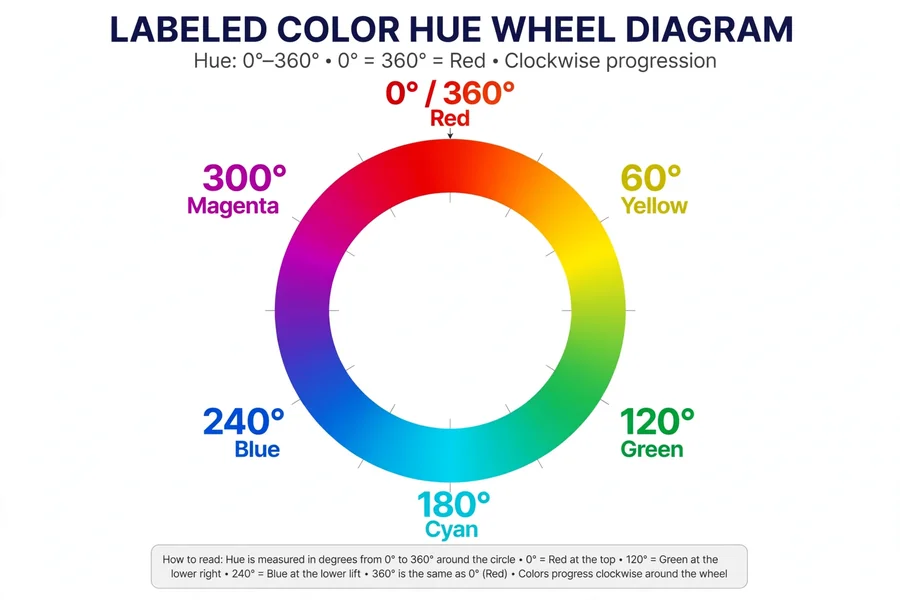
A converted color is only half the job. Text on top of it has to stay readable, and the WCAG standard measures that with a contrast ratio. Normal text needs at least 4.5 to 1 to pass AA, and 7 to 1 to pass AAA.
On tomato, white text scores 2.95 to 1, which fails AA, so white buttons on a tomato background are hard to read. Black text on the same color scores 7.13 to 1, which passes AA and AAA. When you pick a brand color with this converter, convert it, then test your text color against it the same way before the design ships.
Frequently asked questions
How do I convert HEX to RGB?
Split the HEX code into three pairs and read each pair as a base 16 number. For #FF6347, FF is 15 times 16 plus 15, which is 255, 63 is 99, and 47 is 71, giving rgb(255, 99, 71). The converter above does this instantly for any code you paste.
What is the difference between HSL and HSV?
Both use the same 0 to 360 hue, but the third value differs. HSL measures lightness from black to white and is native to CSS, while HSV measures value or brightness and is what Photoshop, Figma, and Illustrator pickers show. Tomato is hsl(9, 100%, 64%) but hsv(9, 72%, 100%).
Is the CMYK conversion accurate for printing?
It is a mathematical approximation, good for estimates but not for final print files. Real print conversion needs an ICC profile for the specific paper and press, which you set in Illustrator or InDesign. Always confirm the final mix with your print shop.
How do I add transparency to a HEX color?
Add two digits at the end for the alpha channel, from 00 for transparent to FF for opaque. Tomato at half opacity is #FF634780. In CSS you can also write rgba(255, 99, 71, 0.5).
What is the shorthand HEX format?
Three digits that double into six, so #F57 becomes #FF5577. It only works when both digits of each pair match, which is why #FF6347 has no shorthand form.
Why do two converters show slightly different values?
Rounding. One tool may show lightness as 64% while another shows 63.9%, and both are correct at their own precision. The math is the same, only the displayed decimals differ.
How do I copy a converted color into CSS?
Click Copy on any row in the results to copy it to your clipboard, then paste it into your stylesheet. HEX and hsl() both work in all modern browsers without any extra setup.
What is the closest Pantone to my HEX color?
Only approximate matching exists. Converters estimate it by measuring color distance, but screens and printed inks cover different ranges. For a real match, compare physical Pantone swatches under proper lighting.
That covers every format this color converter handles, from a pasted HEX code to a print-ready CMYK estimate. Looking for more everyday conversions? Browse our full set of unit converters.
Related calculators

Hex Converter
Convert numbers between hexadecimal, decimal, binary, and octal.
Use calculatorBinary Converter
Convert binary, decimal, octal and hexadecimal in one click.
Use calculatorOctal Converter
Convert between octal, decimal, binary, and hexadecimal instantly.
Use calculatorLength Converter
Convert mm, cm, m, km, inches, feet, yards and miles in one step.
Use calculatorTemperature Converter
Convert Celsius, Fahrenheit, Kelvin and more in one step.
Use calculatorTime Converter
Convert seconds, minutes, hours, days, weeks and years.
Use calculatorCooking Converter
Convert cups to grams, tablespoons and milliliters.
Use calculatorShoe Size Converter
Convert your shoe size between the US, UK, EU, and CM systems.
Use calculatorVoltage Converter
Convert between volts, millivolts, kilovolts, microvolts, and megavolts.
Use calculatorData Storage Converter
Convert between bits, bytes, KB, MB, GB, TB and PB.
Use calculator