Business Days Calculator
Count the business days between two dates, or add business days to a start date to find the deadline. Weekends and your listed holidays are skipped, and every step is shown.
Counting rule. A business day is Monday to Friday. The count skips Saturdays, Sundays, and any listed holiday that falls on a weekday. When you add business days, the start date is never counted and day 1 is the first business day after it.

Formulas verified against standard references. Calculator logic tested with verified worked examples. Published: November 3, 2026 | Last updated: November 3, 2026. Our methodology
What Is a Business Day?
A business day is any weekday your workplace, bank, or school is open, usually Monday through Friday. Saturdays, Sundays, and public holidays are not business days, so a promise of "5 business days" almost always spans a full calendar week.
This calculator works in two modes. Days between dates counts the business days inside a range, which is what payroll, leave, and project planning usually need. Add business days walks forward from a start date and lands on the deadline, which is what contracts and shipping estimates need. If you only need the plain time between two moments, the time duration calculator measures hours and minutes instead.

The Counting Rule
The rule is one subtraction, and the calculator shows its work every time. Here is the exact formula it runs.
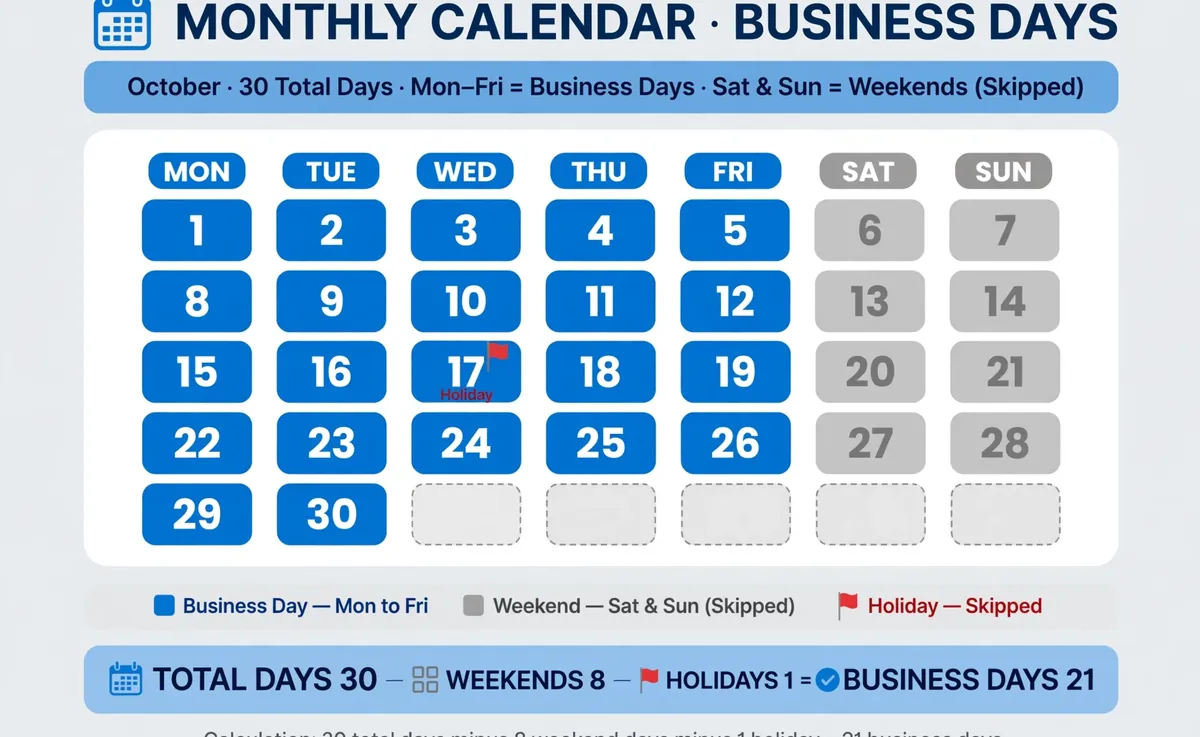
Business Days = Total Calendar Days − Weekend Days − Holidays on Weekdays
Total Calendar Days is the count of days from the start date to the end date. The start date is always counted. The end date counts only when the "Include end date" box is ticked. Weekend Days is the count of Saturdays and Sundays in that span. Holidays on Weekdays is the count of the holiday dates you listed that fall inside the span on Monday to Friday. A holiday that lands on a weekend is ignored, because that day was already skipped.
In Add business days mode the formula flips direction. Result Date = Start Date + N Business Days, counting forward one business day at a time and skipping weekends and listed holidays. The start date is never counted. Day 1 is the first business day after it.
Worked Example
Count the business days from Monday, March 2, 2026 to Friday, March 20, 2026, with the end date included and no holidays listed. Work it through by hand.
Step 1. Total calendar days. March 2 to March 20, both dates included, is 19 days. Step 2. Weekend days. March 7 to 8 and March 14 to 15 are the two weekends inside the range, so 4 weekend days. Step 3. Holidays. None were listed, so 0. Step 4. Subtract. 19 − 4 − 0 = 15 business days.
How to Use the Calculator
- Choose the Days between dates tab or the Add business days tab.
- For a range, pick the start and end dates, tick Include end date if the last day counts, and optionally list holidays one per line.
- For a deadline, pick the start date, enter the number of business days to add, and optionally list holidays.
- Press Calculate to see the result, the supporting numbers, and the steps. Press Reset to clear the form and start over.
Inclusive or Exclusive Counting
The "Include end date" box is the choice that trips people up. Leave it ticked and both endpoints count, which matches payroll and leave math where June 1 to June 5 is five days. Untick it and the end date drops out, which matches deadline math that counts the working days leading up to a date.
When you are unsure, read the wording of the policy or contract. "Through Friday" usually includes Friday, while "within 10 business days of Monday" usually does not count Monday. The calculator states which convention it used in the steps, so the answer is always auditable.
How Holidays Are Handled
The calculator ships with no built-in holiday calendar, because public holidays differ by country, state, and year. You list your own dates in YYYY-MM-DD form, one per line, for example 2026-12-25. A line that is not a real date is flagged by name instead of silently changing the answer.
Only holidays that fall on a weekday change the count. If Christmas falls on a Saturday, it is ignored, because Saturday was already skipped. If a holiday falls outside your date range, it is ignored too. The result names how many holidays were actually excluded, so a zero there tells you to check your list. For calendar-day math that ignores the work week entirely, the date calculator adds or subtracts plain days.
Adding Business Days to a Date
Add business days when a contract, shipment, or SLA is quoted in working time. The start date is never counted, so "1 business day after Friday" is Monday, not Friday itself. The walk skips weekends and your listed holidays one day at a time.
Take Friday, December 18, 2026, add 10 business days, and list 2026-12-25 and 2027-01-01 as holidays. Day 1 is Monday, December 21. Counting forward gives December 21, 22, 23, and 24, then skips Christmas Day, continues through December 28, 29, 30, and 31, skips New Year's Day, and reaches day 10 on Tuesday, January 5, 2027. The span is 18 calendar days with 6 weekend days and 2 holidays skipped.

Frequently asked questions
Does the count include the start and end dates?
The start date is always included. The end date is included only when the "Include end date" box is ticked, which matches the Excel NETWORKDAYS convention.
What exactly counts as a business day?
Any Monday to Friday that is not on your holiday list. Saturdays, Sundays, and listed holidays never count, and a day is never subtracted twice.
What if a holiday falls on a weekend?
It is ignored. The day was already skipped as a weekend, so the holiday changes nothing. Only holidays on weekdays reduce the count.
Does the calculator handle leap years?
Yes. February 29 is counted as a normal weekday when it falls inside your range, and month lengths are handled by the calendar itself.
Can I enter the end date before the start date?
Yes. The calculator swaps the dates automatically and notes it in the steps, so the answer is the same either way.
How is this different from the workdays calculator?
Both skip weekends, but this tool adds a second mode that lands on a result date when you add business days, and it lets you list exact holiday dates instead of a plain count.
Related calculators

Workdays Calculator
Count working days between two dates, excluding weekends and public holidays.
Use calculatorDate Calculator
Add or subtract days, weeks, months, or years from any date.
Use calculatorTime Duration Calculator
Find the exact hours, minutes and seconds between two times.
Use calculatorAge Calculator
Find your exact age in years, months and days from your birth date.
Use calculatorCountdown Calculator
Pick a target date and time to see the exact time left.
Use calculatorDay of Week Calculator
Find the day of the week for any date.
Use calculatorWeek Number Calculator
Find the ISO week number for any date.
Use calculatorTime Zone Converter
Convert any time between time zones with fixed UTC offsets.
Use calculatorAnniversary Calculator
Count the exact time since any special date, with countdown.
Use calculatorBirthday Calculator
See your exact age, the day you were born, and days until your next birthday.
Use calculator