Date Calculator: Add or Subtract Time From Any Date
Pick a start date, choose add or subtract, and enter years, months, and days to get the resulting date, its weekday, and how many days separate the two dates.
Formulas verified against standard references. Calculator logic tested with verified worked examples. Last reviewed: October 2026. Our methodology
How Date Addition Works
Adding time to a date is not like adding ordinary numbers, because months have different lengths and years have leap days. Adding days is straightforward: count forward day by day, crossing month and year boundaries as needed. Adding months is trickier: January 31 plus 1 month has no February 31 to land on, so the result is clamped to the last day of February, which is February 28 in a common year and February 29 in a leap year.
This calculator adds years and months first, with clamping to the target month's last day, then adds or subtracts days. That order matches how most date calculators and calendar apps handle month arithmetic, and it avoids the surprise of January 31 plus 1 month landing in March. All calculations use UTC dates, so time zones and daylight saving changes never shift the result by a day.
For the gap between two known dates, a date difference calculator counts days, weeks, and months between them.

Adding Years, Months, and Days
To add years, keep the month and day the same and increase the year, except for February 29, which becomes February 28 in a non-leap year. To add months, increase the month count, carrying into the year every 12 months, and clamp the day to the target month's length. To add days, move forward one day at a time in the calendar, which automatically handles month lengths and leap years.
Subtraction works the same way in reverse: subtract years and months with clamping, then subtract days. A useful check is to run the calculation backward: the result plus the subtracted amount, or minus the added amount, should return the start date, except when clamping changed the day, as with January 31 plus 1 month.
| Operation | Rule | Example |
|---|---|---|
| Add days | Count forward in the calendar | October 27 plus 90 days is January 25 |
| Add months | Carry every 12 months, clamp the day | January 31 plus 1 month is February 28 |
| Add years | Keep month and day, except Feb 29 | February 29, 2024 plus 1 year is February 28, 2025 |
| Subtract days | Count backward in the calendar | January 10 minus 10 days is December 31 |
Worked Examples
Example 1: October 27, 2026 plus 90 days. Counting forward through November and December lands on January 25, 2027, a Monday. Example 2: January 31, 2026 plus 1 month. February 2026 has 28 days, since 2026 is not a leap year, so the result is February 28, 2026, a Saturday.
Example 3: March 15, 2026 plus 1 year, 2 months, and 15 days. Adding years and months first gives May 15, 2027, then adding 15 days gives May 30, 2027. Example 4: January 10, 2026 minus 10 days. Counting backward gives December 31, 2025, crossing the year boundary.
| Start date | Operation | Result |
|---|---|---|
| October 27, 2026 | Plus 90 days | January 25, 2027 |
| January 31, 2026 | Plus 1 month | February 28, 2026 |
| March 15, 2026 | Plus 1 year, 2 months, 15 days | May 30, 2027 |
| January 10, 2026 | Minus 10 days | December 31, 2025 |
Leap Years and Month Lengths
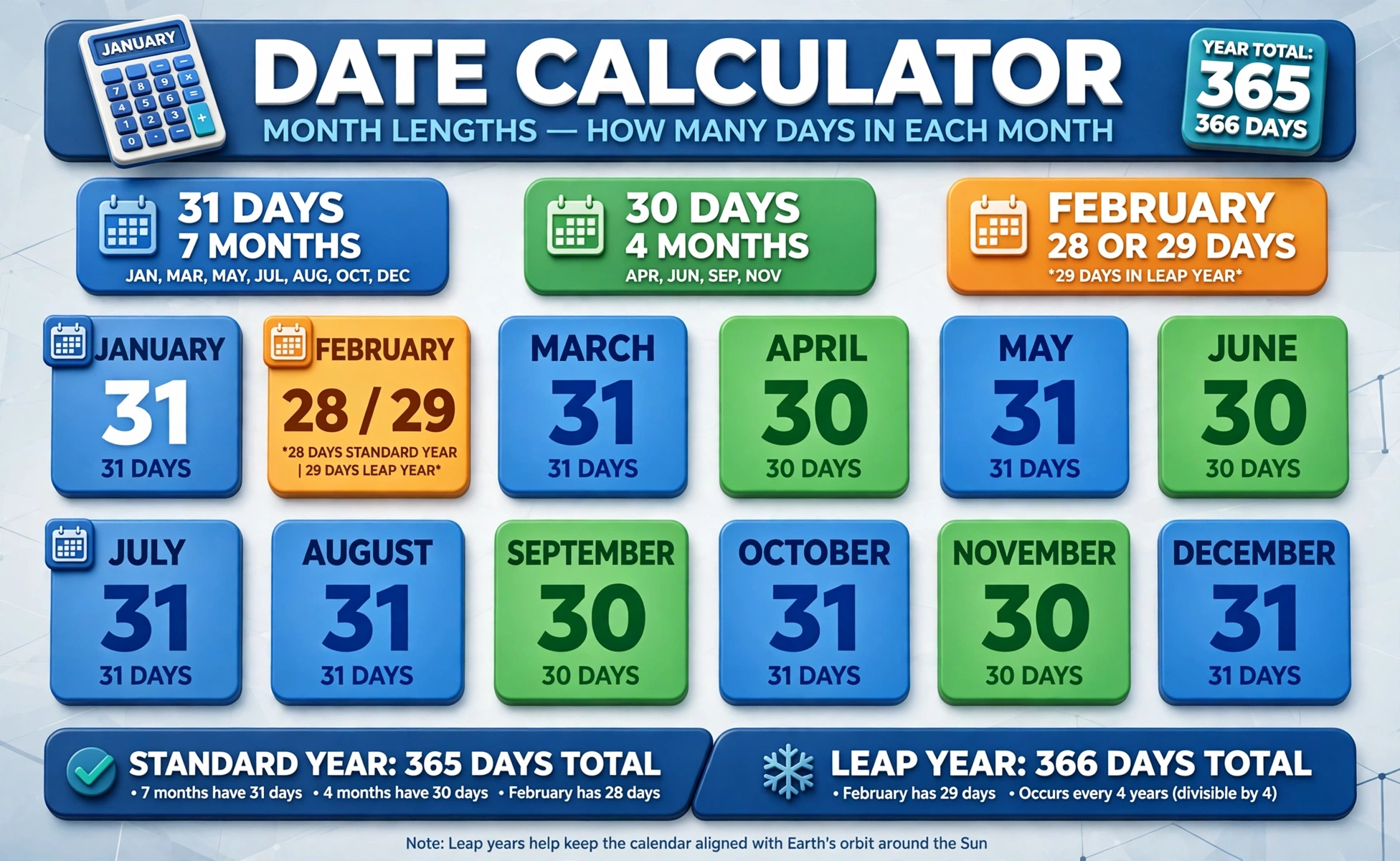
A year is a leap year if it is divisible by 4, except century years, which must be divisible by 400. So 2024 is a leap year, 2026 is not, 2000 was a leap year, and 2100 will not be. Leap years add February 29, which is why February has 29 days in 2024 and 2028, and 28 days in other years.
Month lengths are fixed except February: January, March, May, July, August, October, and December have 31 days, while April, June, September, and November have 30 days. The old knuckle mnemonic, 31 day months on knuckles and 30 day months in the gaps, still works for remembering them without a calendar.
| Month | Days | Month | Days |
|---|---|---|---|
| January | 31 | July | 31 |
| February | 28, or 29 in a leap year | August | 31 |
| April | 30 | September | 30 |
| December | 31 | November | 30 |
Common Mistakes
The most common mistake is treating every month as 30 days: 3 months is not always 90 days, since three calendar months can span 89, 90, 91, or 92 days depending on which months they are. Another mistake is forgetting leap years, which shifts dates after February in a leap year by one day compared with a common year.
A third mistake is expecting January 31 plus 1 month to land on a specific March date. Different tools handle the overflow differently, some clamp to February 28 and some roll into March, so check which rule your tool uses before relying on a month-end result. This calculator clamps, and it says so in the result note.
Practical Uses
Date calculators plan deadlines, subscriptions, warranties, and project schedules: a 90 day trial starting October 27, 2026 ends January 25, 2027, and a 6 month contract starting March 15 ends September 15. They also plan travel, visa stays, and billing cycles, where the exact end date matters more than the rough month count.
For the weekday of any single date, a day of week calculator answers without any addition. Use this date calculator whenever a start date plus a duration, or a start date minus a duration, is the question.

Frequently asked questions
What happens when I add 1 month to January 31?
The result is clamped to the last day of February: February 28 in a common year, or February 29 in a leap year. It does not roll into March.
How do I add 90 days to a date?
Count forward 90 calendar days, crossing month boundaries as needed. October 27, 2026 plus 90 days is January 25, 2027.
Is 2026 a leap year?
No. 2026 is not divisible by 4, so February 2026 has 28 days. The nearby leap years are 2024 and 2028.
How are leap years decided?
A year is a leap year if divisible by 4, except century years, which must be divisible by 400. So 2000 was a leap year, but 2100 will not be.
Does time zone affect the result?
No. This calculator uses UTC dates, so time zones and daylight saving changes never shift the result by a day.
Can I subtract time from a date?
Yes. Choose Subtract, enter years, months, and days, and the calculator counts backward, with the same month-end clamping.
What is the difference between this and a date difference calculator?
This calculator starts from one date and adds or subtracts a duration to find a new date, while a date difference calculator starts from two dates and counts the gap between them.