Derivative Calculator
Find the derivative of any function you type, with the exact symbolic formula and the rule behind each step. Enter f(x), pick the variable, and add a point when you need the numeric value of f'(x) there. Free, no sign-up, and everything runs in your browser.

Formulas verified against standard references. Calculator logic tested with verified worked examples. Published: November 2, 2026 | Last reviewed: November 2026. Our methodology
What Does the Derivative Calculator Do?
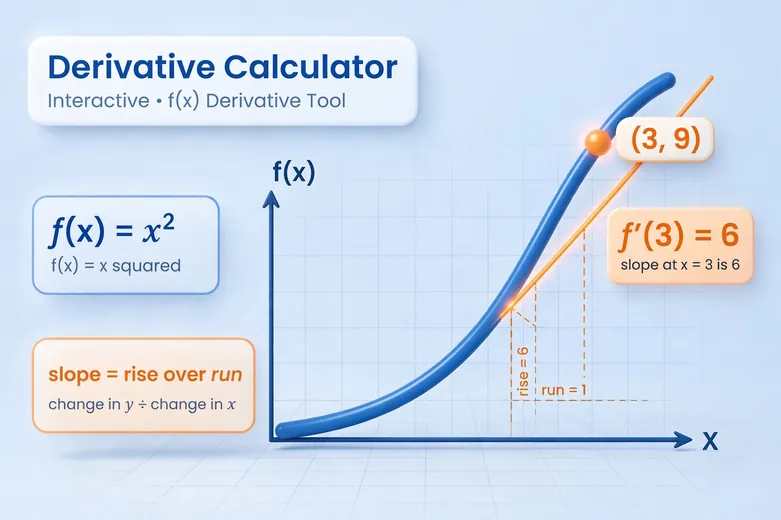
A derivative calculator finds how fast a function changes at each point. Type in f(x) = x^2 and this calculator returns the exact symbolic derivative f'(x) = 2x, names the rules it used, and evaluates the result at any point you choose, so f'(3) comes out as 6.
The calculator differentiates the algebra itself instead of guessing a slope numerically. That means the answer is an exact formula you can reuse, not a rounded estimate. When you add a point, it also runs an independent numeric check with the central difference formula, so you see the symbolic answer and the numeric estimate agree before you trust either one. Try f(x) = sin(x) at x = 0 and you get 1, exactly what the unit circle predicts. For everyday percent-change work that needs no calculus, the percentage calculator handles ratios and growth the simple way.
The Differentiation Rules the Calculator Uses
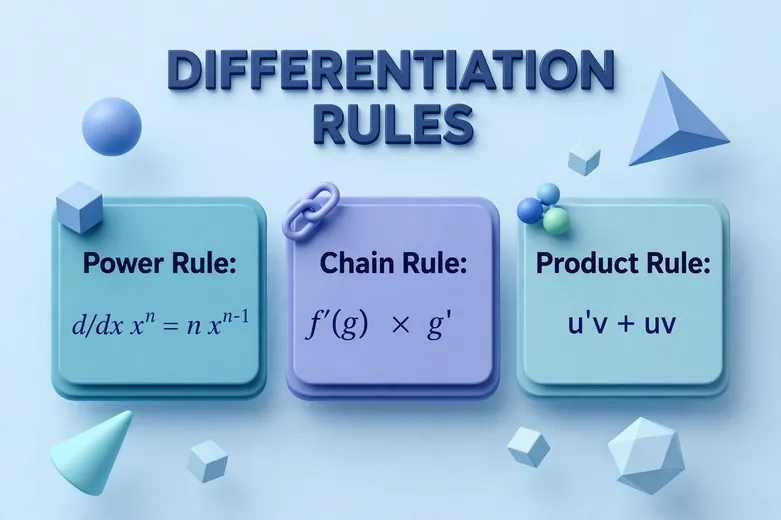
The calculator combines four combination rules with memorized derivatives of the elementary functions, all of which are standard textbook results tabulated in references like the NIST Digital Library of Mathematical Functions. The sum rule splits f + g into f' + g'. The product rule turns (uv)' into u'v + uv'. The quotient rule turns (u/v)' into (u'v - uv') / v^2. The chain rule turns a nested function f(g(x)) into f'(g(x)) times g'(x).
| Function f(x) | Derivative f'(x) |
|---|---|
| x^n | n * x^(n-1) |
| sin(x) | cos(x) |
| cos(x) | -sin(x) |
| tan(x) | 1 / cos^2(x) |
| e^x | e^x |
| ln(x) | 1 / x |
| sqrt(x) | 1 / (2 * sqrt(x)) |
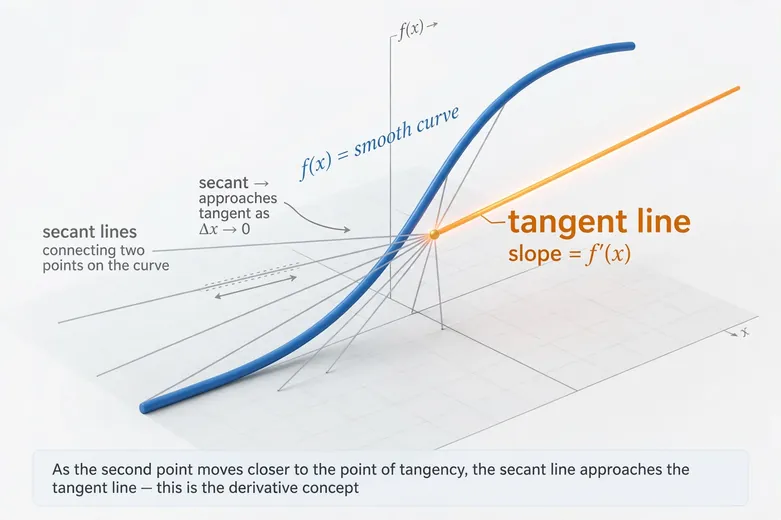
The formal definition sits underneath all of this. The derivative is the limit of the difference quotient as the step shrinks to zero, which is exactly what the numeric check on the results panel approximates. Keep in mind that the trig functions here use radians, so if you need angles in degrees first, the trigonometry calculator converts between degrees and radians before you differentiate.
Worked Example: f(x) = x^2 at x = 3
Take f(x) = x^2 and ask for the derivative at x = 3. The power rule says the derivative of x^n is n times x^(n-1), so with n = 2 the derivative is 2 * x^1, which is 2x. The calculator shows this rule by name, then the symbolic result f'(x) = 2 * x.
Next it substitutes the point. Replace x with 3 in 2x and you get 2 * 3 = 6. The independent numeric check samples the function at 3.00001 and 2.99999, computes (9.00006000 - 8.99994000) / 0.00002, and also lands on 6.000000. Symbolic and numeric agree, so 6 is confirmed.
How to Use the Derivative Calculator
- Type your function in the Function field, for example x^2 + 3*x or sin(2*x). Use ^ for powers and * for multiplication, with parentheses to group terms.
- Choose the variable to differentiate with respect to. The default is x, but t is handy for physics problems with time.
- Enter a point if you want the numeric value of the derivative there. Leave it empty to get only the symbolic formula.
- Press Calculate. The results show the symbolic derivative, the rules used, the value at your point, the step-by-step working, and the numeric cross-check.
What a Derivative Tells You About a Function
The derivative at a point is the slope of the tangent line there, the instantaneous rate of change. If f(x) tracks position over time, f'(x) is velocity and the second pass through the calculator on f' gives acceleration. When f'(x) is positive the function is climbing at that point, when it is negative the function is falling, and a zero marks a candidate peak or valley.
This is why derivatives sit behind so much applied math. Economists read marginal cost as the derivative of total cost, and investors watch how fast balances compound, where the compound interest calculator shows exponential growth in action. Reading the sign of f' across several points sketches the whole shape of the curve without plotting a single extra value.
Common Mistakes When Differentiating by Hand
The most frequent slip is forgetting the chain rule's inner derivative. The derivative of sin(2x) is 2 * cos(2x), not cos(2x), because the inner 2x differentiates to 2. The calculator multiplies that inner factor in automatically, and its step list names the chain rule so you can spot where a hand solution dropped it.
Two more traps show up constantly. The power rule does not apply to exponentials, so d/dx(e^x) is e^x, not x * e^(x-1). And the cosine derivative carries a minus sign, so d/dx(cos x) is -sin(x); dropping that sign flips the whole answer. When a hand result disagrees with this calculator's step-by-step output, one of these three slips is usually the cause.
Symbolic Result and Numeric Check, Together
Most online tools give you one or the other. A numeric-only calculator estimates f'(3) as 6.000000 but never shows the formula 2x behind it. A symbolic-only tool returns 2x but leaves you to evaluate it by hand. This calculator returns the exact formula and, when you supply a point, checks it against the central difference estimate f'(x) ≈ (f(x+h) - f(x-h)) / (2h) with h = 0.00001.
That pairing catches two different kinds of error. The symbolic steps make a misapplied rule visible, and the numeric check makes a mis-typed expression visible, because a wrong function almost never matches its own derivative numerically. Close agreement between the two is strong evidence the answer is right. Where the function is undefined at your point, the calculator says so plainly instead of returning a misleading number.
Frequently asked questions
What is a derivative in simple terms?
A derivative measures the instantaneous rate of change of a function at one point, which is the slope of the tangent line to its graph there. For f(x) = x^2, the derivative is f'(x) = 2x, so at x = 3 the function is rising with slope 6.
How do I type powers, multiplication, and functions in the calculator?
Type x^2 for a power and 3*x or 3x for multiplication, and wrap groups in parentheses. Supported functions are sin, cos, tan, exp, ln, log, and sqrt, written like sin(2*x), plus the constants pi and e. Trig functions use radians, not degrees.
Why is the derivative of sin(2x) equal to 2 cos(2x)?
The chain rule says the derivative of a nested function is the outer derivative times the derivative of the inner part. The outer part sin gives cos(2x), and the inner part 2x differentiates to 2, so the full answer is 2 * cos(2x). Forgetting that inner factor of 2 is the most common differentiation mistake.
What does the numeric check on the results panel mean?
After computing the exact symbolic derivative, the calculator re-checks the value at your point with the central difference formula, sampling f(x) at x + 0.00001 and x - 0.00001. If the numeric estimate agrees with the symbolic value, the answer is confirmed by two independent methods.
What happens if my function is not differentiable at the point I enter?
The calculator tells you instead of guessing. At a point where the function is undefined, has a sharp corner, or a vertical tangent, it shows a plain message explaining the issue. Try a point slightly away from the trouble spot, or check that the expression is defined and smooth there.
Related calculators

Binary Converter
Convert between binary, decimal, octal, and hex.
Use calculatorScientific Notation Converter
Standard form to scientific notation and back.
Use calculatorModulo Calculator
Remainder of any division, with full working steps.
Use calculatorPercentage Calculator
Find P percent of any number, with steps.
Use calculatorCompound Interest Calculator
Grow savings with compound interest over time.
Use calculatorSlope Calculator
Slope of a line between two points, with steps.
Use calculatorFraction Calculator
Add, subtract, multiply, and divide fractions.
Use calculatorTrigonometry Calculator
Sin, cos, tan and triangle values, with steps.
Use calculatorScientific Calculator
Advanced functions, logs, and trig in one tool.
Use calculatorRandom Number Generator
Pick random numbers in any range, instantly.
Use calculator