Virtual Assistant Hourly Rate Calculator
Work out what to charge per hour as a virtual assistant. Enter the income you want to earn in a year, your business expenses, the hours you can actually bill each week, the weeks you work and a buffer for taxes and benefits. The calculator shows your hourly rate, your monthly income and your annual gross, step by step. Free, no sign-up, everything runs in your browser.
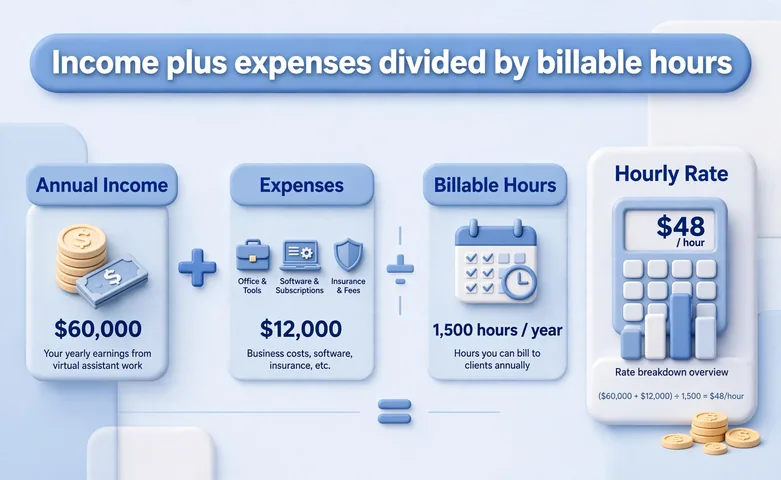
Formula: Annual gross = (Target annual income + Annual business expenses) × (1 + Buffer percent / 100). Annual billable hours = Billable hours per week × Weeks worked per year. Hourly rate = Annual gross / Annual billable hours. Monthly income = Annual gross / 12.

Formulas verified against standard references. Calculator logic tested with verified worked examples. Published: November 7, 2026 | Last updated: November 7, 2026. Fact-checked: November 7, 2026. Our methodology
How to Use the Virtual Assistant Hourly Rate Calculator
Getting your rate takes five quick steps. Start with honest numbers and let the math do the rest.
- Type the annual income you want to earn from virtual assistant work. This is your target pay before tax, not your current salary.
- Type your annual business expenses, such as software, internet, insurance and equipment.
- Type the billable hours you work in a typical week. Count only hours a client pays for, not admin, marketing or learning.
- Type the weeks you work in a year, then set your buffer for taxes and benefits.
- Press Calculate, or press Enter. Your hourly rate appears first and large, with your annual gross, your monthly income and the step-by-step math below.

The Virtual Assistant Hourly Rate Formula
Hourly rate = Annual gross / Annual billable hours, where Annual gross = (Target annual income + Annual business expenses) x (1 + Buffer percent / 100) and Annual billable hours = Billable hours per week x Weeks worked per year.
Target annual income is the pay you want to keep for yourself in a year, before tax. Annual business expenses are the costs of running your work, such as software, internet, insurance and equipment. Billable hours per week are the hours clients pay for, and weeks worked per year leaves out holidays, sick days and quiet weeks. The buffer is a percent added on top for taxes and benefits, so the rate covers costs an employer would normally pay.
The buffer matters because freelancers pay costs employees never see. In the US, self-employment tax alone is 15.3 percent, and income tax, health insurance and retirement savings sit on top of that. Harvest recommends adding 25 to 30 percent for taxes and overhead.
Worked Example: A VA Who Bills 25 Hours a Week
A virtual assistant wants to earn $50,000 a year and spends $5,000 a year on business costs. She bills 25 hours a week and works 48 weeks a year, and she sets a 30 percent buffer for taxes and benefits. Here is exactly what the calculator does.
- Annual billable hours = 25 hours x 48 weeks = 1,200 hours.
- Income plus expenses = $50,000.00 + $5,000.00 = $55,000.00.
- Base rate = $55,000.00 / 1,200 hours = $45.83 an hour.
- Buffer amount = 30 percent of $55,000.00 = $16,500.00, so annual gross = $55,000.00 + $16,500.00 = $71,500.00.
- Hourly rate = $71,500.00 / 1,200 hours = $59.58 an hour.
- Monthly income = $71,500.00 / 12 = $5,958.33.
As a second check, take a virtual assistant who wants $60,000, spends $6,000, bills 30 hours a week for 50 weeks and sets a 25 percent buffer. The annual gross is $82,500.00 across 1,500 hours, which gives $55.00 an hour and $6,875.00 a month.
Billable Hours: The Number Most VAs Get Wrong
A 40-hour working week is not 40 billable hours. Admin, proposals, marketing, invoicing and learning fill a large part of every freelance week, and no client pays for that time. Harvest notes that most freelancers can bill 50 to 70 percent of their time, and SmartBizCalc uses a 75 percent billable rate for established virtual assistants. If you work 40 hours a week, plan on 20 to 30 billable hours.
| Billable hours per week | Annual billable hours |
|---|---|
| 20 | 960 |
| 25 | 1,200 |
| 30 | 1,440 |
| 35 | 1,680 |
Weeks matter just as much. A full year has 52 weeks, but holidays, sick days and quiet spells cut into it. Planning on 48 weeks leaves four weeks for time off. Enter the hours you truly bill, not the hours you sit at your desk, and the rate will cover your real working year.
What Your Buffer Should Cover
Your buffer pays for the costs that sit between your gross income and your take-home pay. It should cover federal and state income tax, self-employment tax, health insurance, retirement savings and unpaid time off. A buffer of 25 to 30 percent is a common starting point.
Once you have your rate, compare it with the market. SmartBizCalc puts 2026 US rates for general admin work at $20 to $30 an hour for a new virtual assistant, $32 to $45 for an experienced one and $45 to $60 for a senior one, while specialized work such as bookkeeping or tech support reaches $60 to $100 an hour. If your calculated rate sits far above the market for your skills, check your billable hours first. If it sits far below, you may be undercharging. You can also compare your rate with employee pay using our salary to hourly calculator.
Common Rate-Setting Mistakes
The most common mistake is dividing by 40 hours a week. That counts admin and marketing as paid work, so the rate comes out far too low. A virtual assistant who works 40 hours but bills 25 needs a rate built on 25.
The second mistake is skipping the buffer. A rate built only on income and expenses leaves no money for tax, so the tax bill comes out of your salary. Set the buffer before you quote.
The third mistake is copying someone else's rate. Rates vary by skill, niche and location, and a rate that works for a US-based executive assistant will not work for a general admin assistant working from a lower-cost country. Build your rate from your own numbers and review it once a year. When your rate changes, check what it means over a full year with our hourly to salary calculator, and keep the new income inside your plan with our budget calculator.
Disclaimer
This calculator gives an estimate for planning and is for informational purposes only, not financial advice. Your actual rate depends on your skills, your clients, your location and your tax situation. See our disclaimer.

Sources
- Harvest: Hourly Rate Calculator for Virtual Assistants. The rate formula, the 50 to 70 percent billable time range, and the 25 to 30 percent allowance for taxes and overhead.
- OwedRate: Freelance Virtual Assistant Rates in Canada (2026). Cross-check for the formula. A $48,000 income with 25 percent overhead and a 25 percent tax set-aside across 1,104 billable hours gives $67.93 an hour, which rounds up to the published $70 rate.
- SmartBizCalc: Virtual Assistant Rate Calculator 2026. US virtual assistant rates by specialty and experience, and the 75 percent billable rate used for established virtual assistants.
- BrieflyDigest: Freelance Hourly Rate Calculator Guide. Second cross-check. A $50,000 income plus $3,200 of expenses with a 30 percent buffer across 1,248 billable hours gives $55.42 an hour.
Frequently asked questions
What is a good hourly rate for a virtual assistant?
US-based virtual assistants typically charge $25 to $75 an hour. New virtual assistants start at $20 to $30 an hour, mid-level virtual assistants charge $35 to $55 an hour, and experienced virtual assistants with specialized skills charge $50 to $90 an hour. Your own rate should come from your income target and billable hours, not from copying someone else.
How do I calculate my virtual assistant hourly rate?
Add your target annual income to your annual business expenses, multiply by 1 plus your buffer as a decimal, then divide by your annual billable hours. For example, $55,000 times 1.30 divided by 1,200 hours is $59.58 an hour.
How many billable hours should I use?
Most freelancers bill 50 to 70 percent of the hours they work. If you work 40 hours a week, plan on 20 to 30 billable hours. Use 48 working weeks a year to leave room for holidays and sick days.
What buffer percent should I use for taxes and benefits?
Start with 25 to 30 percent. In the US, self-employment tax alone is 15.3 percent, and income tax, health insurance and retirement savings sit on top of that.
Should I charge the same rate for every client?
Not always. Specialized work such as bookkeeping or tech support usually earns more than general admin work, and long-term retainers often carry a small discount of 5 to 15 percent in exchange for guaranteed hours.
What is the difference between my hourly rate and a salary?
Your hourly rate must cover costs an employer normally pays, such as taxes, benefits and software, and it only applies to hours a client pays for. An employee salary spreads across 2,080 working hours a year, while a freelancer bills far fewer hours.
Related calculators

Salary to Hourly Calculator
See what an employee salary is worth per hour before you set your VA rate.
Use calculatorHourly to Salary Calculator
Turn your new hourly rate into a yearly salary to compare offers.
Use calculatorOvertime Pay Calculator
Work out overtime pay for extra hours beyond a standard week.
Use calculatorPay Raise Calculator
See what a raise does to your pay before your next rate review.
Use calculator