Business Loan Calculator: Monthly Payment and Total Cost
Find out what a business loan really costs before you sign. Enter the loan amount, annual interest rate and term to get your monthly payment, total interest and full repayment cost — then add an extra monthly payment to see how much sooner you could be debt-free.
Formulas verified against standard references. Calculator logic tested with verified worked examples. Last reviewed: October 2026. Our methodology
Formula
Every payment on a fixed-rate business loan comes from the standard amortizing-loan formula:
M = P × r ÷ (1 − (1 + r)^−n)
- M — the monthly payment
- P — the loan amount (the principal you borrow)
- r — the monthly interest rate: annual rate ÷ 12 ÷ 100
- n — the total number of monthly payments: years × 12
- Total of all payments = M × n
- Total interest = (M × n) − P
An extra monthly payment goes entirely toward principal. Because interest is charged on the shrinking balance, each extra dollar cuts future interest and pulls the payoff date closer. The calculator simulates this month by month and reports the new payoff time and the interest you save.
Worked example
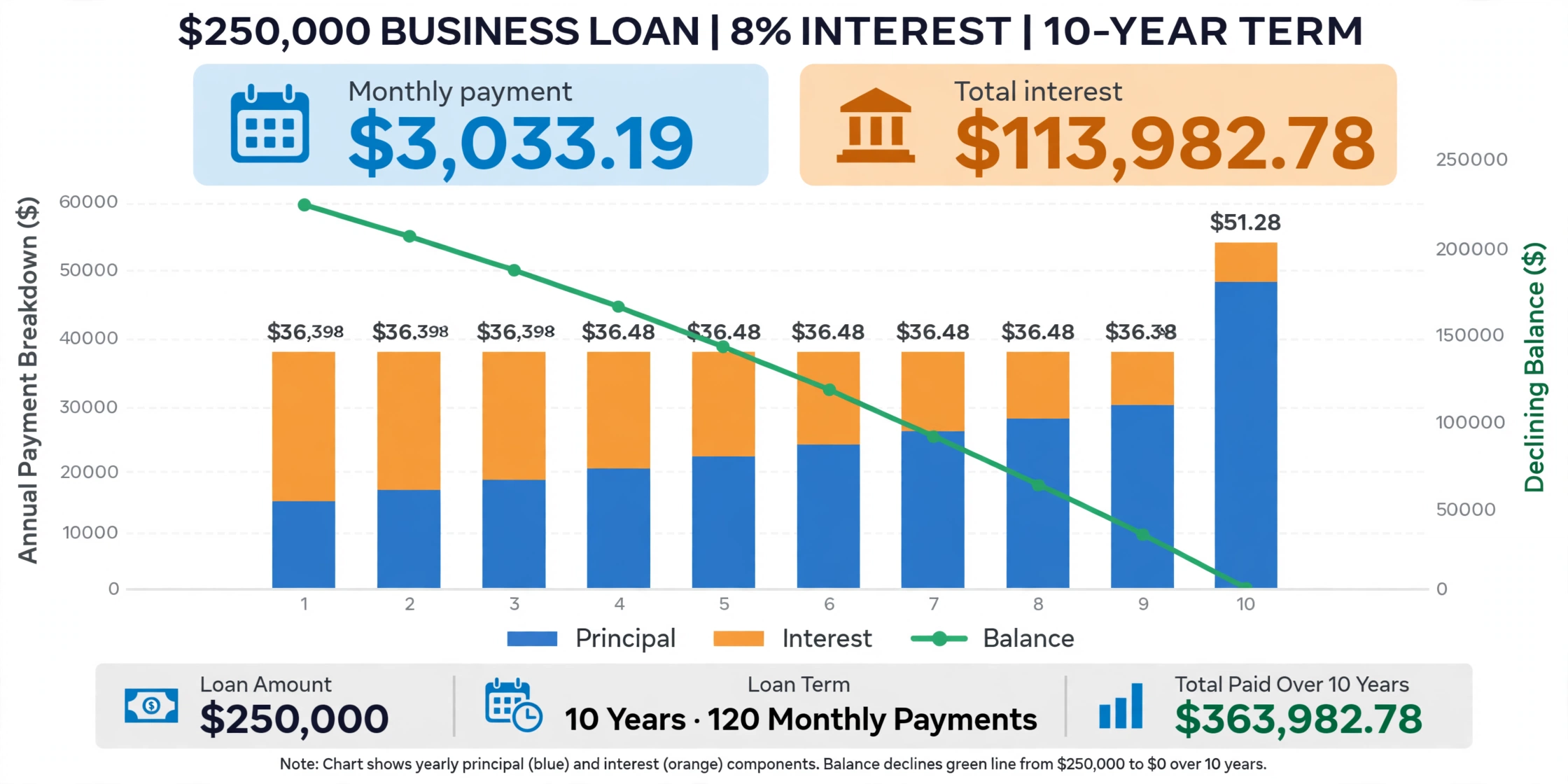
A business borrows $250,000 at an 8% annual interest rate for 10 years.
- Monthly rate: r = 8 ÷ 100 ÷ 12 = 0.006667
- Number of payments: n = 10 × 12 = 120
- Monthly payment: M = 250,000 × 0.006667 ÷ (1 − 1.006667^−120) = $3,033.19
- Total of all payments: $3,033.19 × 120 = $363,982.78
- Total interest: $363,982.78 − $250,000 = $113,982.78
Add a $500 extra monthly payment and the same loan is paid off in 8 years and 1 month. Total interest drops to $89,318.29 — a saving of $24,664.50.
How to use the business loan calculator
The calculator needs four numbers. The first three define the loan; the fourth is optional and shows what extra payments can do.
Step by step
- Enter the loan amount — the total you plan to borrow.
- Enter the annual interest rate from your lender quote.
- Enter the loan term in years.
- Optionally, enter an extra monthly payment to test paying the loan off early.
- Click Calculate to see your monthly payment, total interest, total cost and payoff schedule.
What you get
- Monthly payment — the fixed amount due each month
- Total interest — what the loan costs on top of the amount borrowed
- Total of all payments — principal plus interest over the life of the loan
- Payoff time — how long until the balance reaches zero, shortened by any extra payment
- Year-by-year schedule — how each year’s payments split into principal and interest
For a full payment-by-payment breakdown, our amortization calculator lists every installment with its interest and principal portions.
What this calculator assumes
This calculator models fixed-rate, fixed-term business loans: term loans, equipment loans and SBA-style loans that are repaid in equal monthly installments. It does not model revolving lines of credit, merchant cash advances, or loans whose rate changes during the term.
Common ways businesses use term loans
| Use | Example | Why it fits |
|---|---|---|
| Working capital | Covering payroll during a slow season | A predictable monthly payment smooths cash flow |
| Equipment | Buying ovens for a bakery | The loan term can match the equipment’s useful life |
| Expansion | Opening a second location | Models the full repayment cost before you commit |
| Refinancing | Replacing a higher-rate loan | Compare the old payment with the new one |
The calculator uses the nominal annual rate you enter. It does not add origination fees, documentation fees or closing costs, and it does not compute an APR. The U.S. Small Business Administration publishes current information on federal loan programs for small businesses.
Extra payments: how much interest you can save
Every extra dollar goes straight to principal, so the balance falls faster and less interest accrues. The table below uses the $250,000, 8%, 10-year example:
| Extra per month | Payoff time | Total interest | Interest saved |
|---|---|---|---|
| $0 | 10 years 0 months | $113,982.78 | — |
| $250 | 8 years 11 months | $100,103.99 | $13,878.79 |
| $500 | 8 years 1 month | $89,318.29 | $24,664.50 |
The earlier extra payments start, the larger the saving, because the balance is highest in the early years. Before committing, check your loan agreement for prepayment penalties — some lenders charge a fee for paying off early.
Which KitQuarter loan tool should you use?
Each loan calculator on KitQuarter answers a different question:
| Tool | Best for |
|---|---|
| Business Loan Calculator | Business term loans, with extra-payment modeling |
| Loan Calculator | A general-purpose loan for any borrower |
| Loan EMI Calculator | Monthly installments with an EMI focus |
| Mortgage Calculator | Home loans with taxes, insurance, PMI and HOA |
| Car Loan Calculator | Vehicle price, down payment and trade-in |
| Amortization Calculator | A full payment-by-payment loan schedule |
For a plain personal or general-purpose loan rather than a business one, use our loan calculator.

Frequently asked questions
How is a business loan monthly payment calculated?
With the amortizing-loan formula: monthly payment = P × r ÷ (1 − (1 + r)^−n), where P is the loan amount, r is the monthly interest rate (annual rate ÷ 12 ÷ 100) and n is the number of monthly payments. For example, $250,000 at 8% over 120 months gives a $3,033.19 monthly payment.
What is the difference between this and a regular loan calculator?
The math is the same, but this calculator is framed for business borrowing: it highlights working capital, equipment and expansion uses, models extra monthly payments to shorten the payoff, and explains assumptions like fixed rates and excluded fees that matter when comparing lender offers.
How much can extra monthly payments save?
On a $250,000 loan at 8% over 10 years, an extra $250 a month pays the loan off in 8 years and 11 months and saves $13,878.79 in interest. An extra $500 a month pays it off in 8 years and 1 month and saves $24,664.50.
Does this calculator include loan fees or show the APR?
No. It uses the nominal annual interest rate you enter and does not add origination fees, documentation fees or closing costs. The APR, which bundles fees into a single yearly cost figure, is not computed here — use our APR calculator if you need the fee-inclusive cost.
Can I use this calculator for an SBA loan?
Yes, for fixed-rate SBA term loans that are repaid in equal monthly installments. It does not model revolving SBA lines of credit or loans with rates that change during the term.
What happens if I enter a 0% interest rate?
With a 0% rate the calculator skips the compounding formula and divides the loan amount evenly across the months, so total interest is $0 and each payment is pure principal.
How long should a business loan term be?
It depends on the purpose. A shorter term means higher monthly payments but much less total interest; a longer term lowers the payment but raises the total cost. As a rule of thumb, match the term to how long the purchase will serve the business — equipment loans to the equipment’s useful life, expansion loans to the expected payoff horizon.
Related calculators

Loan Calculator
Calculate monthly payment, total interest, and total cost with an amortization breakdown.
Use calculatorMortgage Calculator
Estimate your monthly mortgage payment with taxes, insurance, PMI and HOA — plus the full amortization schedule.
Use calculatorCompound Interest Calculator
See how your savings grow with compounding interest over time.
Use calculatorROI Calculator
Measure investment returns with ROI, gain or loss and annualized growth.
Use calculatorAPR Calculator
See the true annual cost of a loan including upfront fees.
Use calculatorAmortization Calculator
Compute monthly payments, total interest and a full loan schedule.
Use calculator