Summation Calculator
Add any list of numbers or sum a whole series with this summation calculator. Paste your numbers or set a start, end, and step, press Calculate, and get the total plus the count, mean, minimum, and maximum, with every step shown. It adds decimals exactly, handles negatives, and never rounds mid calculation. Free, no sign-up, everything runs in your browser.
Formula: S = x1 + x2 + ... + xn for a list, or S = n(a + l) / 2 for a series.

Formulas verified against standard references. Calculator logic tested with verified worked examples. Published: November 5, 2026 | Last updated: November 5, 2026. Our methodology
How to Use the Summation Calculator
Getting an answer takes four quick steps. The tool has two modes, and both live on the same form.
- Pick "Number list" to add your own numbers, or "Sequence" to add a run like 1 to 100.
- In Number list mode, type or paste numbers into the "Numbers to add" box. Separate them with commas, spaces, semicolons, or line breaks. Write 1000, not 1,000, because a comma starts a new number.
- In Sequence mode, fill in Start, End, and Step. Use a step of 1 to add every number, 2 for every second number, and a negative step to count down.
- Press Calculate, or press Enter. The result shows the total, the count, the mean, the minimum, and the maximum, plus a step by step breakdown. Press Reset to clear the form and start over.

The Summation Formulas
A sum is the total you get when you add numbers together. This page uses three formulas. One adds a list, one is sigma notation, and one adds a whole series in a single step.
Sum of a list
S = x1 + x2 + ... + xn. Here S is the sum and each x is one number from your list. The mean is the sum divided by n, the count of numbers.
Sigma notation
Mathematicians write a sum with Σ, the Greek letter sigma. Σ xi from i = 1 to n means add the terms x1 through xn. The value under the sigma is the starting index, the number above it is the ending index, and the expression after it is the term you add each time.
Sum of an arithmetic series
When the terms rise or fall by a fixed step, you can skip the long addition. The sum is S = n(a + l) / 2, where n is the number of terms, a is the first term, and l is the last term. The term count is n = floor((l - a) / d) + 1, where d is the step. For 1 to 100 with a step of 1, n = 100 and S = 100(1 + 100) / 2 = 5050.
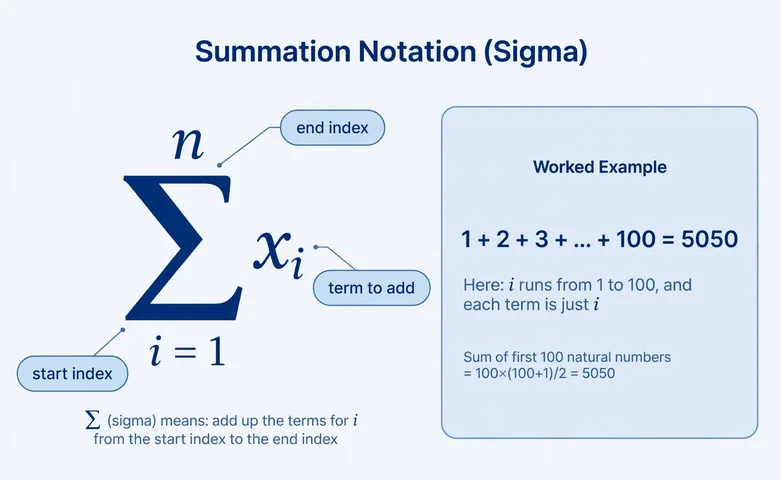
Worked Example: Adding 1 to 100
Here is the classic case, adding the numbers 1 to 100, worked in Sequence mode with Start = 1, End = 100, and Step = 1.
- Count the terms: n = floor((100 - 1) / 1) + 1 = 100.
- Apply the series formula: S = 100(1 + 100) / 2 = 100 × 101 / 2 = 5050.
- Find the mean: 5050 / 100 = 50.5. The smallest term is 1 and the largest is 100.
A list example works the same way. The numbers 12, 45, 78, 23, 56, 91, 34 add to 339. The count is 7, the mean is 339 / 7 = 48.428571, the minimum is 12, and the maximum is 91. If the mean is what you care about most, the average calculator goes deeper on it.
Common Mistakes to Avoid
Most wrong answers come from the input, not the math. Watch for these five.
- Commas inside numbers. Writing 1,000 splits into 1 and 0, because the comma is a separator. Write 1000.
- A step of zero. A sequence needs a direction, so the step can never be zero. The tool rejects it with a plain message.
- The wrong step sign. Counting down from 10 to 1 needs a negative step. A positive step with a lower end is rejected, not silently emptied.
- Mixing up sum and mean. The sum is the total. The mean is the total divided by the count. For 10, 20, and 30, the sum is 60 and the mean is 20.
- Rounding too early. This tool adds decimals exactly and rounds only the mean, to 6 decimal places, at the very end.
Where Summation Shows Up in Real Life
Any column of figures you add is a summation. Grocery receipts, invoice lines, and monthly expenses all work the same way. Paste a column copied from a spreadsheet into Number list mode and the total appears with the mean and the range in one step.
Sequence mode covers runs like page numbers, ticket numbers, or the numbers 1 to 100. For the full statistical picture of a list, the mean, median and mode calculator takes the same numbers further. Once you have a total, the percentage calculator finds what share one line item is of it.

Frequently asked questions
How do I add a list of numbers with this calculator?
Pick Number list mode, paste the numbers separated by commas, spaces, or line breaks, and press Calculate. The tool shows the total, count, mean, minimum, maximum, and a step by step breakdown.
What is sigma notation?
Sigma notation is shorthand for a sum. The Greek letter Σ means add up the terms, the number below it is where you start, the number above it is where you stop, and the expression after it is the term you add each time. So Σ i from 1 to 100 means 1 + 2 + ... + 100.
How do you find the sum of 1 to 100?
Use the series formula S = n(a + l) / 2. With n = 100, a = 1, and l = 100, the sum is 100 × 101 / 2 = 5050. Type 1, 100, and 1 into the Start, End, and Step fields and the calculator shows the same answer.
What is the difference between sum and mean?
The sum is the total of all the numbers. The mean is the sum divided by how many numbers there are. For 10, 20, and 30, the sum is 60 and the mean is 20.
Can I add negative numbers and decimals?
Yes. The list mode accepts negatives, decimals, and scientific notation. Decimals are added exactly, so 0.1 + 0.2 gives 0.3.
What does the step do in Sequence mode?
The step is the gap between terms. A step of 1 adds every number, a step of 2 adds every second number, and a negative step counts down. The step can never be zero.
Related calculators

Average Calculator
Free average calculator: paste your numbers to get the mean, median, mode, range, min, max and sorted list...
Use calculatorMean Median Mode Calculator
Get mean, median, mode and range from any number list.
Use calculatorStandard Deviation Calculator
Find the standard deviation and variance of any dataset, sample or population.
Use calculatorFactorial Calculator
Exact factorials up to 300 with digit counts and trailing zeros.
Use calculatorExponent Calculator
Raise any base to any exponent with expansions and scientific notation.
Use calculatorPercentage Calculator
Find what P% of any number is, instant answers with the formula shown.
Use calculator