Church Livestream Setup Cost Calculator
Add up what a church livestream setup really costs before you buy anything. Enter your cameras and the price of each one, your audio, lighting and streaming hardware, cables and installation labor, then add the monthly platform and internet costs. The calculator shows the one-time setup cost, the monthly cost and the first-year total, step by step. Free, no sign-up, everything runs in your browser.
Formulas: Setup cost = (Number of cameras × Cost per camera) + Audio + Lighting + Streaming hardware + Cables + (Installation hours × Hourly rate). Monthly cost = Streaming platform + Internet upgrade. First-year total = Setup cost + (12 × Monthly cost).

Formulas verified against standard references. Calculator logic tested with verified worked examples. Published: November 7, 2026 | Last updated: November 7, 2026. Fact-checked: November 7, 2026. Our methodology
How to Use the Church Livestream Setup Cost Calculator
Getting an answer takes six quick steps. The tool adds up the gear you buy once, the labor to install it, and the monthly services, so start with the cameras and work down the list.
- Type the number of cameras and the cost of each camera. Two cameras is a common starting point for a sanctuary, and one is enough for a small room.
- Type what the audio equipment, lighting, streaming hardware and cables cost. Streaming hardware covers the switcher, capture device or encoder. Enter 0 where you already own the item.
- Type the installation hours and the hourly labor rate. Enter 0 hours if volunteers do the install.
- Type the monthly streaming platform cost and any monthly internet upgrade. YouTube is free, while managed platforms such as Resi start at $99 a month. Enter 0 where nothing applies.
- Press Calculate, or press Enter. The setup cost appears first and large, with the monthly cost, the first-year total and the step-by-step math below.
- Press Reset to clear the form and start over.
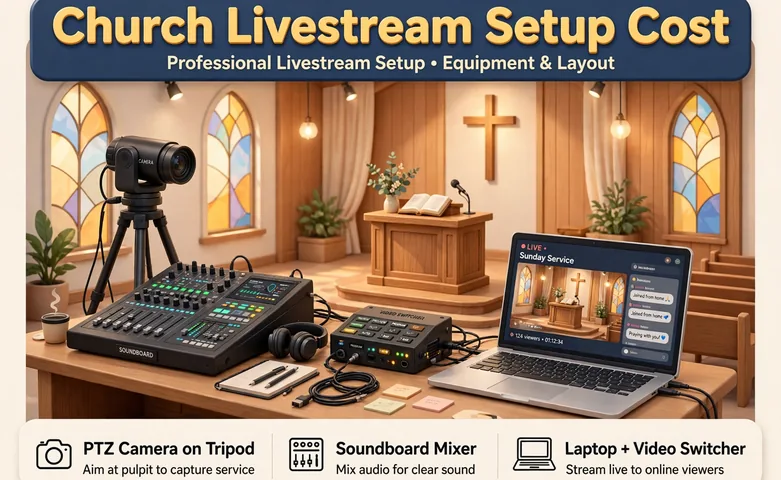
The Church Livestream Setup Cost Formulas
Three formulas price the three numbers a church board actually asks for, which are what the gear costs once, what the stream costs each month, and what the first year costs in total.
Setup cost: Setup cost = (Number of cameras × Cost per camera) + Audio + Lighting + Streaming hardware + Cables + (Installation hours × Hourly rate). Every item is a one-time purchase or a one-time labor charge, so the setup cost is what you pay before the first stream.
Monthly cost: Monthly cost = Streaming platform + Internet upgrade. A free platform such as YouTube makes this zero, while a managed platform adds a monthly subscription.
First-year total: First-year total = Setup cost + (12 × Monthly cost). Twelve months of the monthly cost is added to the setup cost, so the first-year total is the number to put in the budget.
Worked Example: A Two-Camera Setup
A church buys 2 cameras at $1,349 each, audio equipment for $250, lighting for $180, streaming hardware for $445, cables for $100, and 6 hours of installation at $75 an hour. The streaming platform costs $99 a month and the internet needs no upgrade. Here is exactly what the calculator does.
- Cameras = 2 × $1,349.00 = $2,698.00.
- Add audio, lighting, streaming hardware and cables: $2,698.00 + $250.00 + $180.00 + $445.00 + $100.00 = $3,673.00.
- Add installation labor: 6 hours × $75.00 = $450.00, so the setup cost is $3,673.00 + $450.00 = $4,123.00.
- Monthly cost = $99.00 + $0.00 = $99.00.
- First-year total = $4,123.00 + (12 × $99.00) = $4,123.00 + $1,188.00 = $5,311.00.
As a check, one camera at $1,349 plus a $99.99 capture device comes to $1,448.99, which matches the one-camera equipment total ChurchPosting lists from vendor prices. Two of the same cameras plus a $445 switcher comes to $3,143, which matches their two-camera total too.
What Each Part Typically Costs
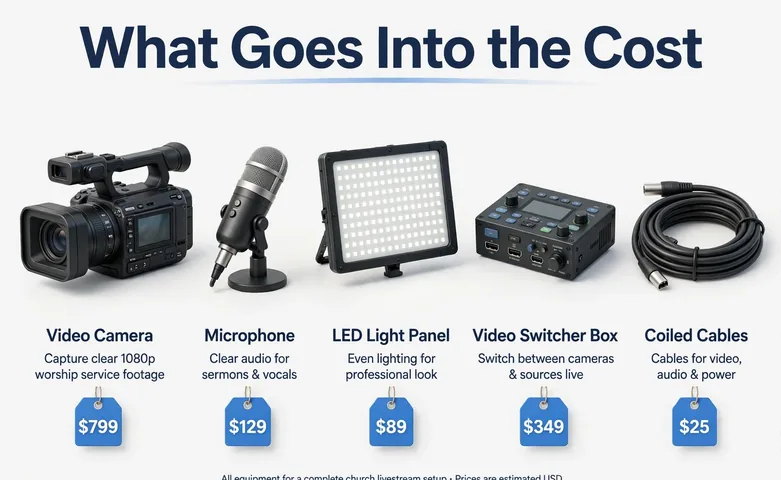
Guides that price real carts agree on the shape of the spending, even when the exact products differ. A phone and a tripod can start a stream, one good camera lifts the picture, and a second camera plus a switcher lifts the production. The table below shows the three common tiers.
| Tier | What you get | Typical setup cost |
|---|---|---|
| Phone starter | Phone you own, tripod, microphone, cable from the sound board | $45 to $115 |
| One camera | One PTZ or camcorder, capture device, mixer or audio interface | $370 to $1,449 |
| Two cameras and a switcher | Two cameras, a switcher, audio interface, mounts and cables | $1,600 to $3,143 |
Our worked example at $4,123 sits above the two-camera tier because it adds lighting and paid installation. A church that installs the gear with volunteers and already owns lighting lands near the $3,143 tier instead. Check the purchase against the wider church finances with our budget calculator and use our percentage calculator to work out what share of the annual budget the setup takes.
Monthly Costs and the First Year
The monthly cost is small next to the gear, but it never stops, so it decides the first-year total more than people expect. YouTube and Facebook streaming are free. Managed platforms that add scheduling, a church website player and Sunday morning support cost $99 to $299 a month, or $1,188 to $3,588 a year. A $99 platform adds $1,188 to the first year, and a $299 platform adds $3,588.
Internet is the other monthly line. A 720p stream needs about 16 Mbps of upload speed with room to spare, and the rule guides use is an upload speed of twice the stream rate. If the church connection already clears that, enter 0 for the internet upgrade. If it does not, price the faster plan and enter the extra monthly cost, not the full bill, because the church pays for internet whether it streams or not. A free platform keeps the first year equal to the setup cost, while a paid platform can add thousands.
Common Livestream Setup Mistakes
The most common mistake is buying the camera first. Every guide that prices real setups gives the same upgrade order, which is audio first, internet second, camera third, then lighting and the switcher last. A $20 audio fix beats a $500 camera, because viewers leave a stream they cannot hear.
The second mistake is forgetting the license. Streaming songs under copyright needs a streaming license, such as the CCLI Streaming License, before the service goes live. It is a separate cost from the gear and the platform, so check it before the first stream.
The third mistake is leaving cables, mounts and installation out of the estimate. A 50-foot cable run, a camera mount and a day of labor can add hundreds of dollars, and they are the lines most likely to surprise a board. List every line in this calculator before you ask for approval, and confirm the payments with our business loan calculator if the church borrows to pay for the setup.
Disclaimer
This calculator gives an estimate for planning and is for informational purposes only, not financial advice. Actual prices depend on the products you choose, your installer, your platform and your internet provider. See our disclaimer.
Frequently asked questions
How much does a church livestream setup cost?
A phone starter kit costs $45 to $115, a one-camera setup costs about $370 to $1,449, and a two-camera setup with a switcher costs $1,600 to $3,143 before lighting and installation. Our worked example with two cameras, lighting and paid installation totals $4,123 for setup and $5,311 for the first year.
What equipment does a church need to live stream?
A church needs a camera, a sound feed from the sound board, and a way to send the picture to the internet, such as a capture device or a switcher. Most churches of 100 to 300 people start with one remote-controlled camera, a capture device and a computer they already own.
Is YouTube free for church live streaming?
Yes. YouTube Live and Facebook Live cost nothing, and free OBS Studio turns a computer into the encoder. Managed platforms such as Resi and BoxCast cost $99 to $299 a month and add scheduling, a website player and support.
How fast does church internet need to be for streaming?
A 720p stream needs about 16 Mbps of upload speed with room to spare, and the rule guides use is an upload speed of twice the stream rate. Use a wired ethernet connection, not Wi-Fi, because a dropped connection ends the stream.
Do churches need a license to stream music?
Yes, when the service includes songs under copyright. A streaming license, such as the CCLI Streaming License, covers the music in the stream. Check the license before the first stream, because it is separate from the gear and the platform.
Should a church buy one camera or two?
One camera is enough for a small room and a single wide shot. Two cameras let the stream cut between the pulpit and the worship team, which is why most churches add the second camera and a switcher as their first upgrade.